
Security researchers have uncovered a new macOS-focused information-stealing campaign that employs a refined ClickFix attack chain, abusing the built-in Script Editor application to bypass Apple’s latest security safeguards and deploy Atomic Stealer malware stealthily. This campaign marks a significant evolution of social engineering tactics targeting Mac users, moving away from Terminal-based command execution to leverage trusted system utilities for illicit code deployment.

What Is ClickFix and Why the Shift to Script Editor?
ClickFix is a well-documented social engineering technique that tricks users into running malicious commands to compromise their devices. Traditionally, these attacks relied on coaxing victims to copy and paste obfuscated shell commands directly into Terminal, a method increasingly mitigated by Apple’s enhanced paste-blocking and command-scanning mechanisms in recent macOS updates.
Threat actors have adapted by shifting execution away from Terminal to Script Editor, the default macOS utility for creating and running AppleScript and JavaScript for Automation (JXA) workflows. As a preinstalled, Apple-signed application, Script Editor enjoys high system trust and often evades casual user scrutiny, making it an ideal vector for evading detection and executing unauthorized code.
Full Attack Chain
Discovered and documented by Jamf Threat Labs, this campaign follows a streamlined, highly deceptive workflow designed to minimize user friction and maximize infection success:
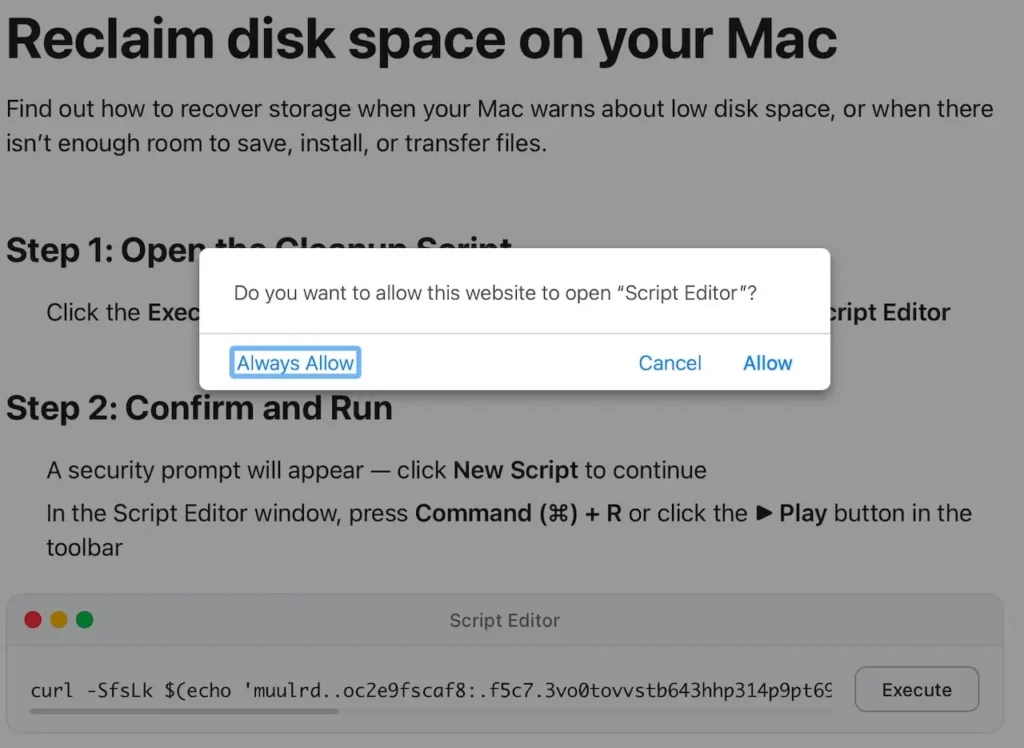
- Malicious Landing PageUsers are directed to counterfeit web pages mimicking official Apple support or system maintenance portals, claiming to resolve “low disk space,” “performance issues,” or “cache errors” with a one-click fix.
- Protocol TriggerClicking the purported “repair” or “clean” button does not navigate to a standard webpage but invokes the applescript:// URL protocol, prompting the browser to open Script Editor.
- User Approval BaitA standard system dialog requests permission to launch Script Editor. Most users grant approval, associating the action with routine system maintenance.
- Preloaded Malicious ScriptScript Editor opens with a pre-filled, heavily obfuscated AppleScript payload. Victims are instructed to click Run to complete the “repair” process.
- Payload DeploymentThe malicious script decodes embedded URLs and executes curl | zsh commands to fetch the second-stage payload directly into memory, avoiding disk-based detection:
- Decrypts hidden command-and-control URLs to bypass static signature checks
- Downloads the Atomic Stealer Mach-O binary to a temporary directory
- Removes quarantine attributes and grants execution permissions
- Launches the stealer silently in the background with no visible indicators
What Data Does Atomic Stealer Target?
Atomic Stealer (also referenced as AMOS) is a mature, feature-rich information thief designed exclusively for macOS. In this campaign, it is programmed to exfiltrate:
- Passwords, secure notes, and certificates from Keychain
- Browser credentials, cookies, autofill data, and saved payment cards
- Desktop files, documents, and system profile information
- Recovery phrases and private keys for popular cryptocurrency wallets
- Some variants include backdoor functionality for persistent remote access
Key Advantages Over Legacy ClickFix Attacks
This updated tactic delivers three critical improvements for attackers:
- Bypasses Terminal Protections: Avoids Apple’s enhanced scanning for pasted commands in Terminal, neutralizing a primary defense against older ClickFix campaigns.
- Simplified User Interaction: Eliminates copy-paste steps; infections require only two clicks: Allow and Run.
- Enhanced Stealth: Uses a native, signed Apple utility, blending into legitimate system behavior and reducing the likelihood of alerts from security tools.
How to Protect Your macOS Device
- Reject Unexpected Script Editor or Terminal Requests: Deny prompts to open Script Editor or Terminal unless you explicitly initiated the action.
- Avoid Unofficial “Cleanup” or “Optimization” Pages: Only trust built-in macOS tools and official Apple support content for system maintenance.
- Strengthen Security & Privacy Settings: Navigate to System Settings > Privacy & Security to restrict script execution to trusted applications.
- Keep macOS Updated: Install the latest system patches to benefit from Apple’s evolving anti-ClickFix protections.
- Deploy Endpoint Security: Use reputable security software to monitor for unusual Script Editor activity, curl spawning, and unauthorized persistence mechanisms.
Conclusion
This campaign underscores the rapid evolution of macOS‑focused malware, shifting from vulnerability exploits to social engineering + trusted system tool abuse. Threat actors continue to exploit user familiarity with default Apple utilities to bypass security controls and steal sensitive data.
While technical defenses improve, user awareness remains the strongest line of defense. Mac users should treat any prompt to run scripts or commands from web pages as highly suspicious, regardless of how official or urgent the message appears.
Leave a Reply